Search and filters
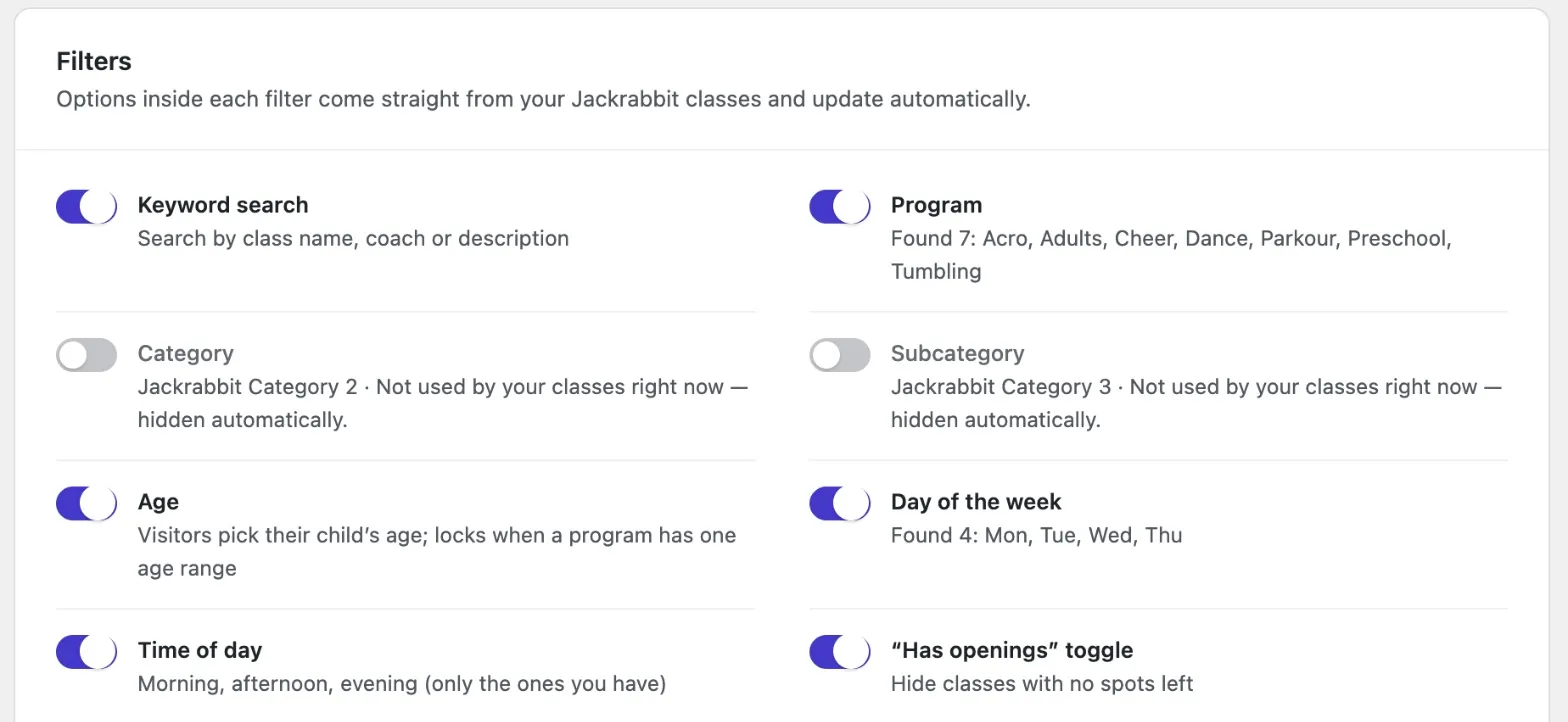
Keyword, program, sub-category, location, gender, child's age, day, time of day, and "has openings." Turn on only the filters your studio needs.
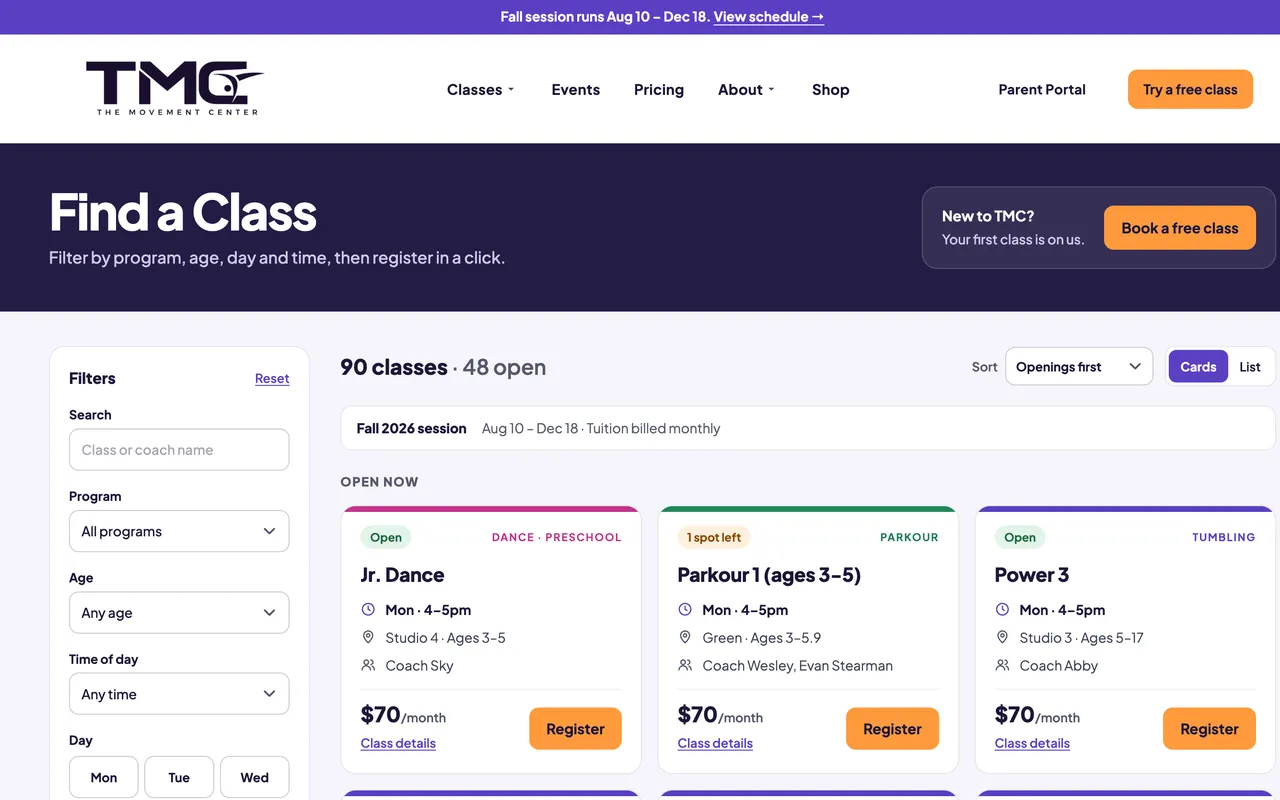
Class Finder for Jackrabbit Class turns your class list into a searchable, mobile-friendly directory on your WordPress site. Families filter by program, age, day, and time, see what's open, and go straight to registration.
This demo uses sample classes at a made-up studio. On your site, Class Finder shows your real classes from Jackrabbit, in your colors.
Sample data. Register buttons don't open a real class in this demo.
Is there a class for my child's age? Does it fit the family's schedule? Is there room? Class Finder answers all three without making anyone read the whole schedule, and it works on the phone a parent is probably holding.
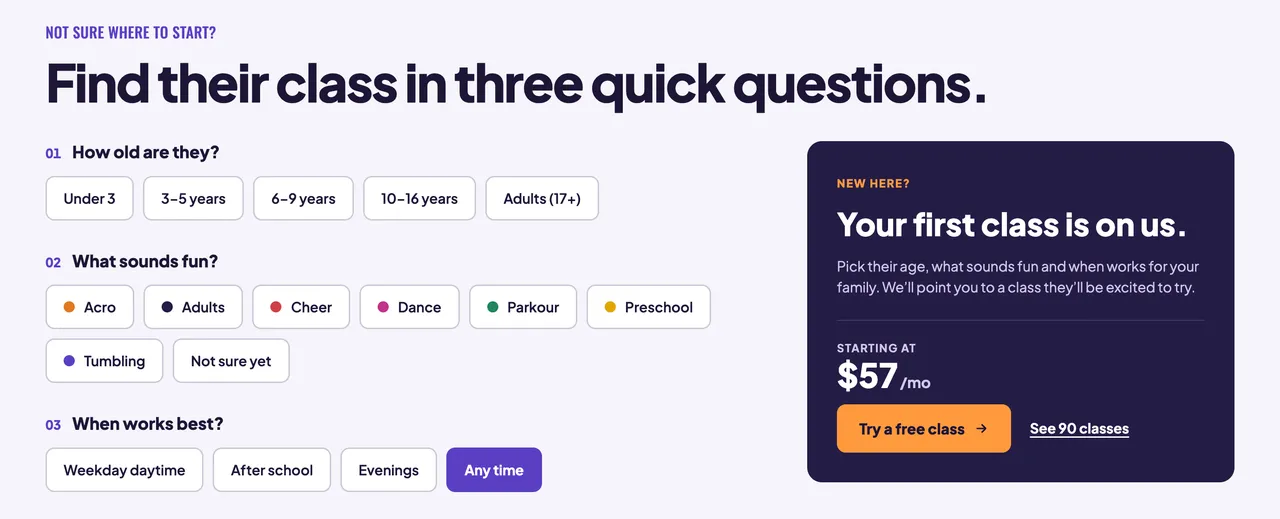
Someone who doesn't know your program names can answer three questions: how old, what sounds fun, and when works best. Answers only offer choices that have classes, and "Not sure yet" suggests the programs that fit best.
Keyword, program, sub-category, location, gender, child's age, day, time of day, and "has openings." Turn on only the filters your studio needs.
Each class shows Open, spots left, Waitlist, or Full. Open classes come first, followed by a compact list of waitlisted and full classes.
Register and Join Waitlist buttons go straight to that class in Jackrabbit, so families don't have to find it again.
Three questions point new families to a program, with its starting price, openings, a free-trial button, and a link to the matching classes.
A sticky filter bar, a slide-in filter drawer, quick day chips, and compact class cards keep the search easy on a small screen.
Every filtered view has its own link. Use one for dance classes for 7-year-olds in an email, an ad, or a program page.
Set colors, labels, and card fields from WordPress. Give each program its own icon, color, gradient, or photo strip.
Add it with the [jr_class_finder] shortcode, a WordPress block, or an Elementor widget. Limit any page to one program or a few filters.
A saved copy of your classes keeps pages fast, and the finder keeps showing it if Jackrabbit can't be reached.
Jackrabbit's built-in class listing tables are a good fit for a simple list, and they work on almost any website. Class Finder is for WordPress sites that want families to search, filter, and get guided to a class.
| Feature | Jackrabbit tables | Class Finder |
|---|---|---|
| Setup | Paste Jackrabbit's code into a page | Install the plugin and enter your Organization ID |
| Layout | A table of classes | Class cards, plus a compact waitlist and full list |
| Filtering | Set in advance when the table is created | Families choose filters on the page |
| New families | Read the list | Answer three questions and get matched |
| Availability | Shown in the table | Open, spots left, Waitlist, and Full badges |
| Design | Table styling | Colors, icons, labels, and card fields set in WordPress |
| Website platforms | Any site that supports JavaScript | WordPress only |
| Cost | Included with Jackrabbit | Paid plugin |
Add the plugin to your WordPress site.
Enter your Jackrabbit Organization ID. The settings page shows the connection status.
Choose filters, colors, and card fields, with a live preview built from one of your real classes.
Add the finder to any page with a block, a shortcode, or an Elementor widget.
The Class Finder settings page shows the connection status and how many classes are synced, then keeps every option in one place, with a live preview built from one of your real classes.
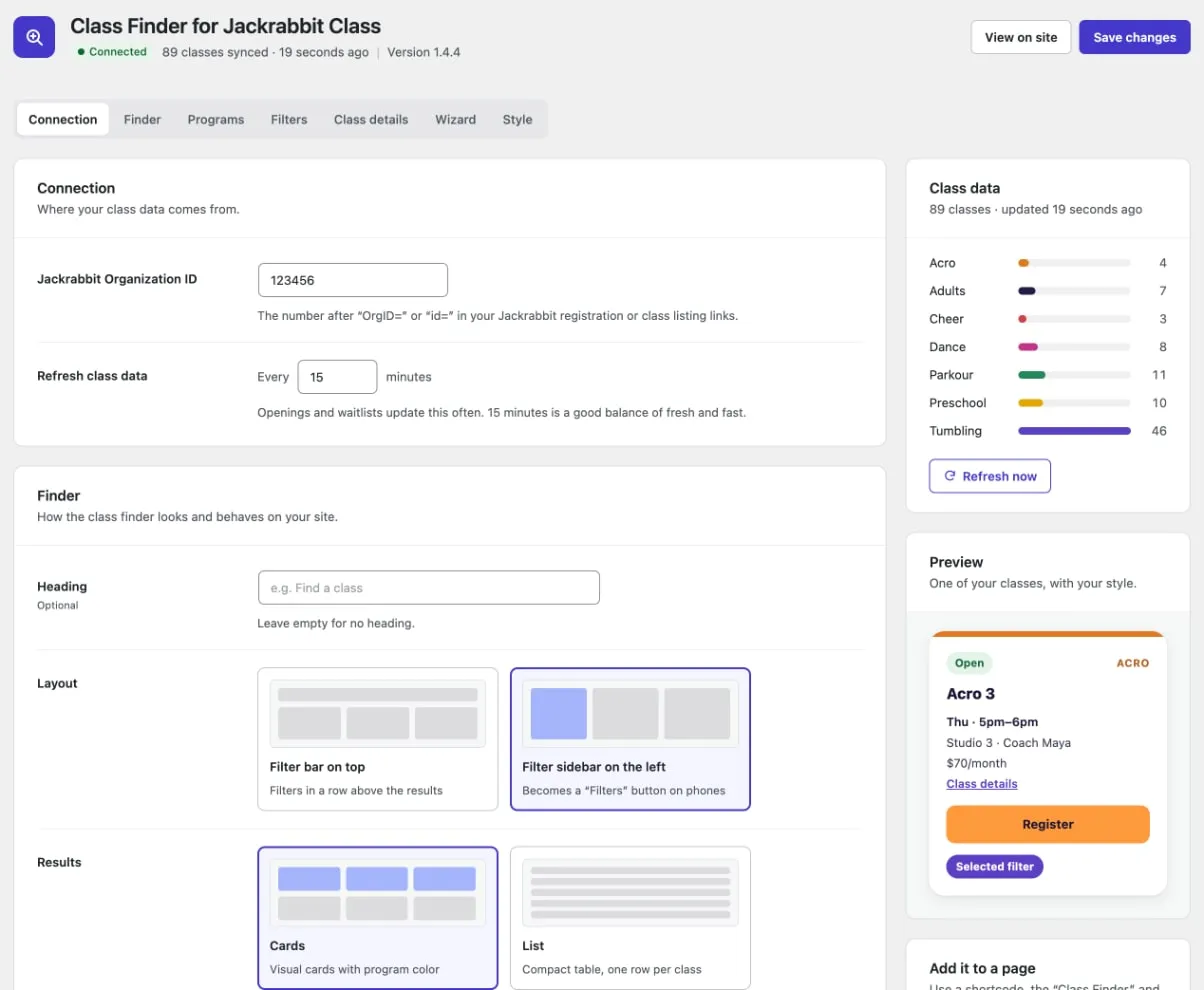
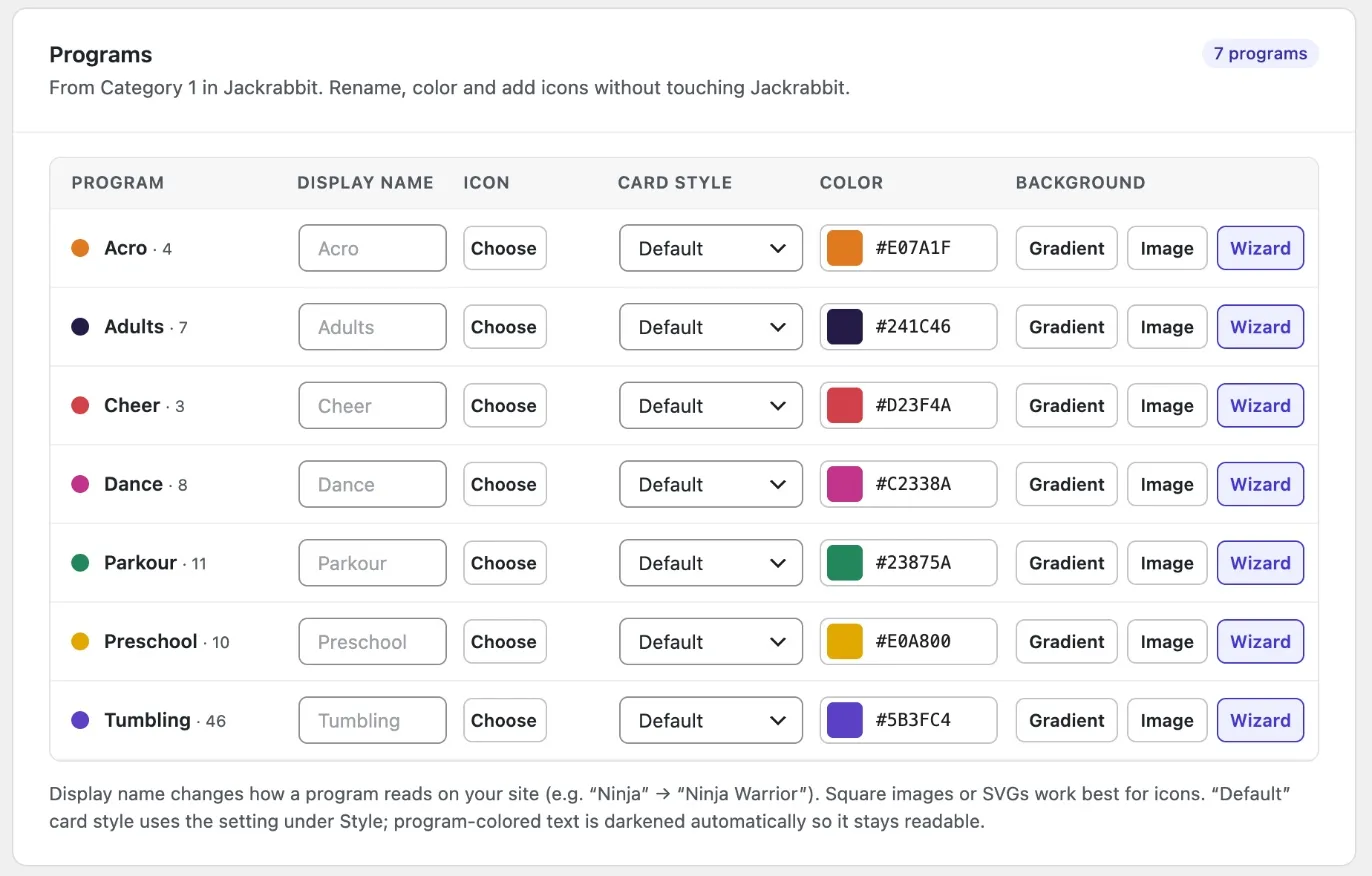
Class Finder was built for The Movement Center, where families use it to browse live classes, pricing, openings, and waitlists. It comes from a dancing and studio management background, not just a developer's idea of how registration should work.
An active Jackrabbit Class account and your Organization ID. Class Finder reads the same class and openings information your studio already keeps in Jackrabbit, so there is no second class list to maintain.
No. Classes, ages, schedules, prices, and openings come from Jackrabbit. Add or change a class in Jackrabbit, and the finder picks up the change the next time it refreshes.
Class Finder keeps a copy on your server and refreshes it every 15 minutes by default. You can set the refresh anywhere from 5 minutes to 24 hours.
The finder keeps showing the last good copy of your classes instead of going blank, then tries again shortly after.
Families browse on your website, then the Register or Join Waitlist button takes them to that class in Jackrabbit to finish. Accounts, tuition, and enrollment stay in Jackrabbit.
WordPress 6.0 or newer and PHP 7.4 or newer. Class Finder is a WordPress plugin, so it does not run on Wix, Squarespace, or other website builders.
No. Add Class Finder with a shortcode or a WordPress block. If your site uses Elementor, there are widgets for that too.
Yes. Programs come from your own Jackrabbit categories, so it can list gymnastics, swim, cheer, dance, and other class-based programs.
Yes. Modevfy can install and configure Class Finder on your site, or build a new WordPress site around it.
No. Class Finder is built by modevfy and is not affiliated with or endorsed by Jackrabbit Technologies. Jackrabbit is a trademark of its owner.
Need a whole site built around Jackrabbit? See WordPress websites with Jackrabbit Class integration.
Class Finder is being prepared for more studios, and pricing is coming soon. Share your website and modevfy will follow up with next steps.
Not affiliated with or endorsed by Jackrabbit Technologies. Jackrabbit is a trademark of its owner.